Vr Mapping |
ON-LINE REFERENCE DOCUMENTATION CARDINAL SYSTEMS, LLC |
Delete Triangles in Polygons (DelTri)
Type: Batch Application
Deletes or changes layers of triangle lines that are inside closed polygons.
Detailed Description
Searches polygons in user‑defined layers and removes or re‑layers any triangles that fall inside those polygons. This is typically used when the polygons represent ponds or buildings that were applied as break lines, resulting in triangles forming inside the closed areas. Removing triangle lines from polygons that were not used as break lines is not recommended and can produce unpredictable results.
A triangle line must consist of four points with the first and last point being common. Layers that are turned off will not be considered even if specified. Delete Triangles in Polygons is undoable.
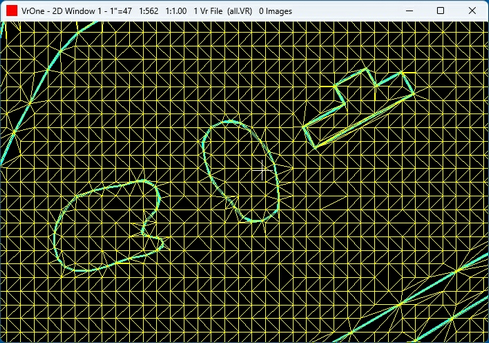
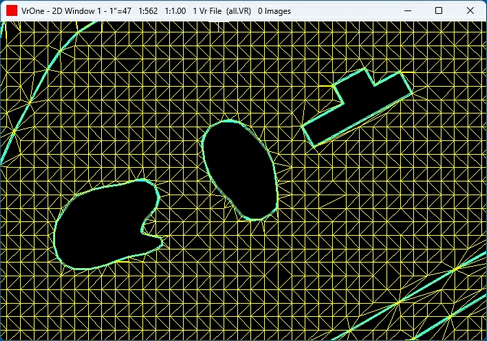
Available Key-ins
Key-in |
Description |
Range |
PARFIL= |
Load parameter file |
Delete Triangles in Polygons parameter file name (.dpp) |
RUN |
Run Delete Triangles in Polygons |
|
Parameters for Delete Triangles Inside Polygons
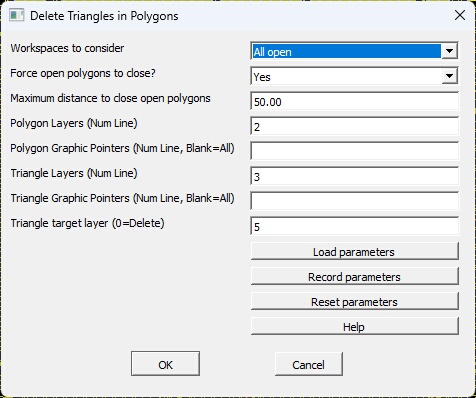
Delete Triangles in Polygons main dialog
Workspaces to consider
Defines the workspaces to consider.
Force open polygons to close
The line polygons used to identify triangles for deletion or re-layering must be closed. If a polygon is open, setting this parameter to 'yes' will force it closed by adding a temporary line segment. Use this option carefully. The added segment is not part of the intended break line and was not considered during DTM triangle creation. If the closing segment spans too large a gap, it can produce unpredictable or incorrect results.
Maximum distance to close open polygons
If 'Force open polygons to close' is set to 'Yes', this parameter defines the maximum allowable length of the closing segment. The software will measure the length of the temporary segment used to close the polygon. If that length exceeds this value, the polygon will not be used to delete or re‑layer the triangle lines inside it. The value is in ground units.
Polygon Layers (Num Line)
This parameter is used to identify polygon lines. These polygons contain the triangle lines that will be deleted or re‑layered. It defines the polygon line layers that will be checked for triangle lines. Multiple layers may be selected by using a Number Line.
Polygon Graphic Pointers (Num Line, Blank=All)
An additional parameter may be included in the polygon layer search: the layer’s graphic pointer. This parameter defines the polygon line graphic pointers to use when searching for polygon lines. If the value is non‑zero, both the polygon line layer and its graphic pointer must match for the polygon line to be included in the search. Multiple layers may be selected by using a Number Line. If blank then all graphic pointers will be considered.
Triangle Layers (Num Line)
This parameter is used to identify triangle lines. Any triangle lines that fall within the closed polygon lines will be deleted or re‑layered. Multiple layers may be selected by using a Number Line.
Triangle Graphic Pointers (Num Line, Blank=All)
An additional parameter may be included in the triangle layer search: the layer’s graphic pointer. This parameter defines the triangle line graphic pointers to use when searching for triangle lines. If the value is non‑zero, both the triangle line layer and its graphic pointer must match for the triangle line to be included in the search. Multiple layers may be selected by using a Number Line. If blank then all graphic pointers will be considered
Triangle target layer (0=Delete)
When a triangle line is found inside a closed polygon line, it will be deleted or moved to the layer number specified by this parameter. If this parameter is set to zero, the triangle line will be deleted.
Load parameters [Button]
Loads the parameters from a previously recorded parameter file.
Record parameters [Button]
Records the current parameters to a parameter file. This file will automatically be loaded when Delete Triangles in Polygons (DelTri) is started again.
Reset parameters [Button]
Resets the current parameters to default values. NOTE: Parameters that have not been recorded (saved) will be lost.
Help
Displays this help page.
Created August 2026 - Vr version 07.02.01